I’ve been having some AT&T Fiber related outages lately at home. Since I work from home, it’s rather important that I have uptime, especially during the day.
I’ve added in a Verizon Home 5G device to segregate my work related traffic from my personal traffic, rather than complex VLAN configurations.
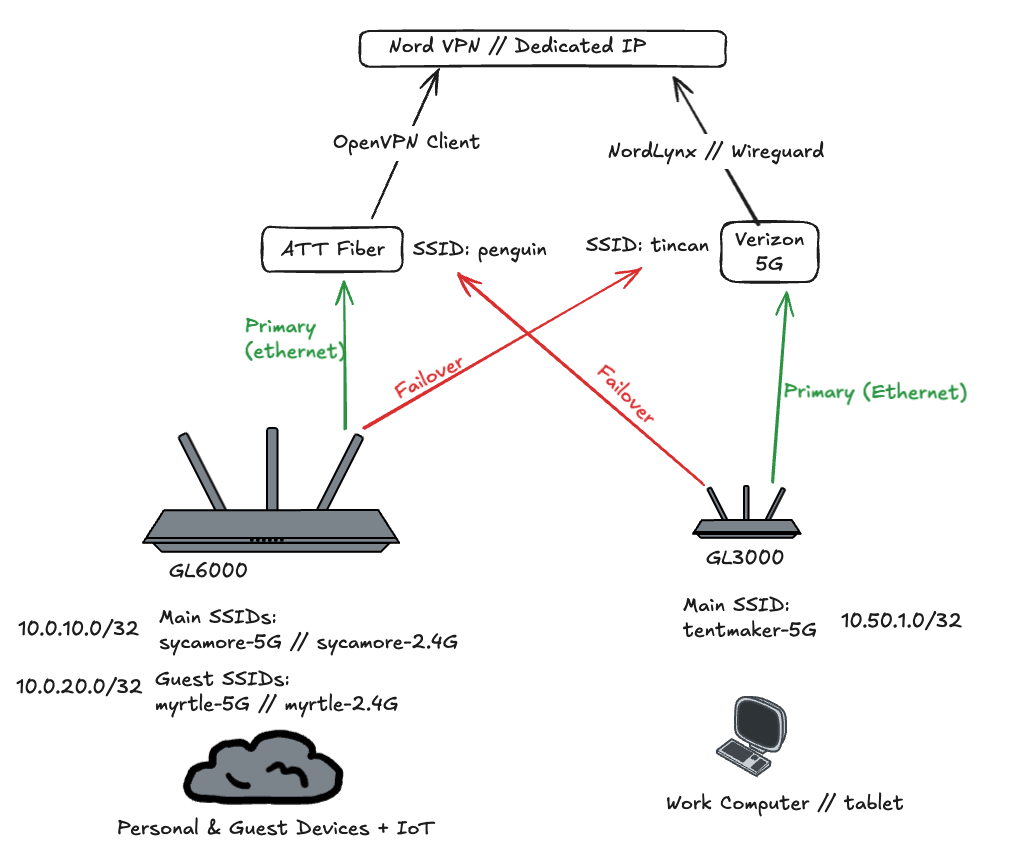
My new network topology:
Some discoveries:
- I recently discovered how awesome the little GL.iNET devices are, especially as they run OpenWRT.
- I discovered how solid the NordVPN static IP’s actually are, and how they allow for streaming services, especially when configured on the router for all devices.
Some outcomes:
- All work traffic is routed through a pocket travel router that I can take with me, and is protected by a Wireguard Nord VPN connection with a static IP.
- All personal traffic is routed through a larger router that is also protected by NordVPN (OpenVPN), to the same static IP.
- I can “exclude” certain devices from the router’s VPN connection, such as my sprinkler, Ring cameras, etc.
- I now have a solid “guest network” for visitors to join, that also is protected by Nord VPN traffic.
- My AT&T Fiber is my main personal ISP, but the router is configured to fall back to the Verizon 5G.
- My work traffic is routed through the Verizon 5G connection, but the router is configured to fall back to AT&T Fiber.
Is it overkill? Perhaps. But it’s more expensive to lose time fighting with AT&T, since they’ve been having outages the last couple of months.